Back to Home

AI Outfit Generator

Turn Separate Garments Into a Complete Look

Combine a top and bottom, place them on a model, and explore a full outfit before a shoot, listing update, or purchase decision.

  • Mix tops and bottoms
  • Preset and custom models
  • Fast outfit concepts
AI Outfit Generator
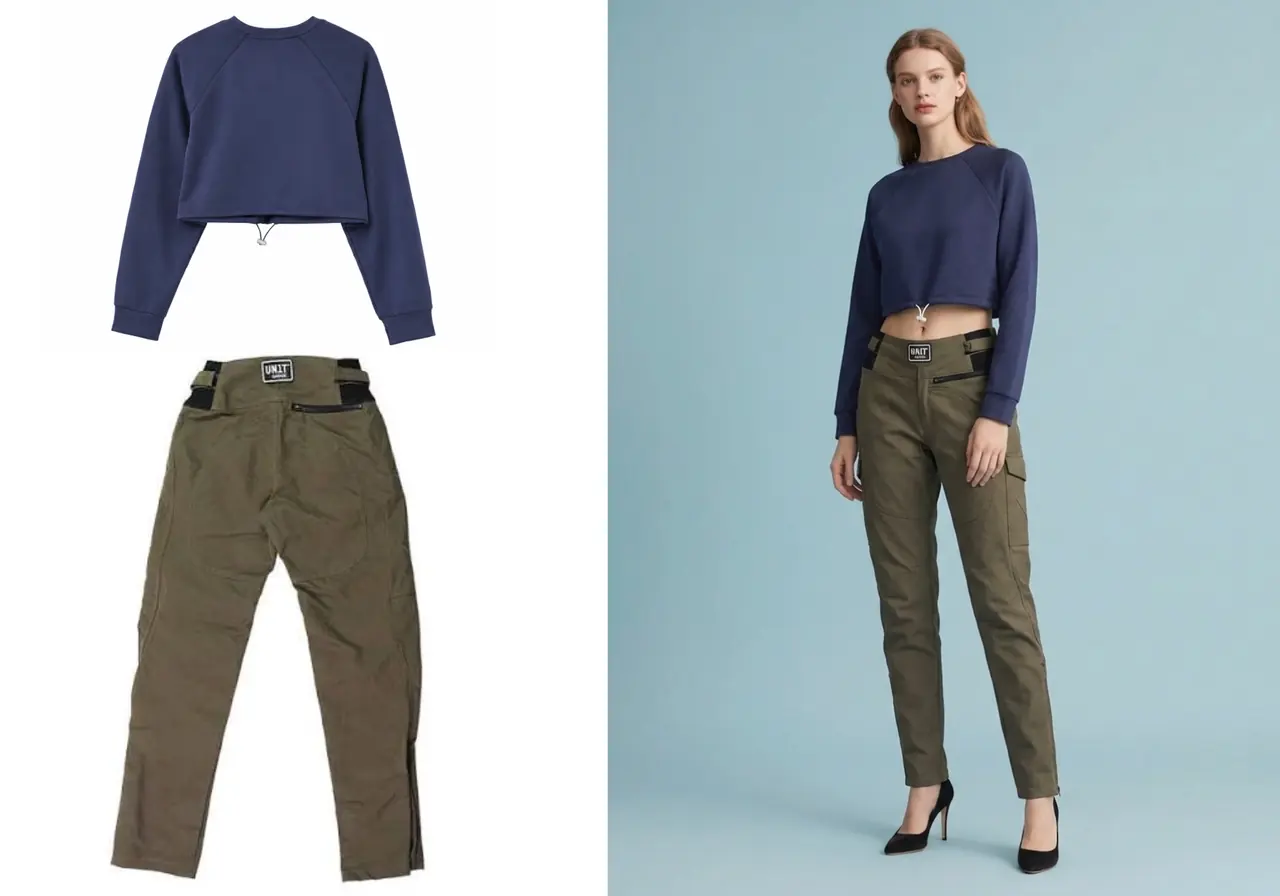
AI outfit generator example showing separate garment pieces turned into a complete outfit preview

Overview

Move from clothing pieces to a visual outfit

The AI outfit generator is designed for moments when flat product photos are not enough. It creates a model-based preview so the relationship between garments, color, proportion, and styling is easier to judge.

For the clearest combination, upload one garment per image and avoid folded, cropped, or heavily covered products.

Real examples

How people can use this page to make a decision

01

Build a cross-sell outfit

Problem
A store wants to show that a new knit top pairs well with an existing skirt, but both items were photographed separately.
Workflow
Upload the top and bottom separately, keep one model selected, and generate a combined outfit preview.
Useful result
The merchandising team gets a visual concept for collection pages, email modules, or product recommendations.
02

Draft creator campaign looks

Problem
A creator needs several outfit directions before deciding which products to feature in a short-form video.
Workflow
Generate a few top-and-bottom combinations on the same model to compare color balance and silhouette.
Useful result
The strongest outfits can be shortlisted before ordering samples or planning the shoot.
03

Test wardrobe combinations

Problem
A shopper has product images from different stores and wants to see whether the pieces work together.
Workflow
Use the separate upload flow and preview the two items on a single model-like image.
Useful result
The generated look helps the shopper decide whether the combination feels cohesive enough to buy or wear.

Why it works

Move from clothing pieces to a visual outfit

01

Combine separate pieces

Upload a top and bottom independently to build an outfit from products that were photographed apart.

02

Compare styling directions

Try different combinations on the same model to make color and silhouette comparisons easier.

03

Create shareable concepts

Generate a visual reference for a store team, creator brief, campaign plan, or personal wardrobe decision.

How it works

Choose separate upload

  1. 01

    Choose separate upload

    Select the top-and-bottom-separate option in the Fitroom upload area.

  2. 02

    Add both garments

    Upload one clear top image and one clear bottom image, then select a suitable model.

  3. 03

    Review the outfit

    Generate the image and check garment balance, visual harmony, and overall styling direction.

Image requirements

Give each garment its own clear slot

The outfit generator works best when it can understand the top and bottom separately, then combine them around one model pose.

Best inputs

  • A top image with neckline, sleeves, and lower hem visible.
  • A bottom image with waistband, full length, and side edges visible.
  • Similar lighting direction between the two garment photos when possible.
  • A model image or preset with a simple pose that leaves the torso and legs readable.

Avoid

  • Two garments merged into one messy collage when separate upload is available.
  • Folded product photos where the full shape is unclear.
  • Images with mannequins, hangers, or hands covering important edges.
  • Extremely different camera angles that make the top and bottom hard to align.

Limitations

What an outfit preview cannot guarantee

AI outfit generation is strongest for planning style direction. It should not be treated as a perfect physical simulation of fabric, fit, or sizing.

  • The generated result may adjust proportions so the outfit fits the selected model pose.
  • Exact fabric drape, transparency, shine, and texture can differ from the real garments.
  • Complex layering, tucked-in styling, belts, and accessories may need extra review.
  • When used for selling, keep real product photos and accurate product details available near the purchase decision.

Use cases

Move from clothing pieces to a visual outfit

Merchandising

Show complementary items together and plan cross-sell combinations for product collections.

Creator content

Draft fresh outfit visuals for posts and campaign concepts before production.

Wardrobe planning

Preview combinations from clothing photos when deciding what to wear or buy.

FAQ

Questions, answered

Can the outfit generator combine two clothing images?

Yes. Choose the separate option to upload a top and bottom independently.

Is this the same as a text-to-image fashion generator?

No. This workflow starts from clothing images and places those garments on a model rather than inventing an outfit only from text.

Can I use my own model photo?

Yes. You can switch to User Upload and add a suitable model image.

Should I upload the top and bottom together or separately?

Use separate upload when you want control over each garment. Use together when the outfit is already shown clearly as one complete source image.

Can sellers use this for product bundles?

Yes. It is useful for previewing cross-sell outfits, bundles, collection concepts, and lookbook directions before final review.

What makes an outfit result look more natural?

Use clean garment images, choose pieces with compatible perspective and lighting, and keep the model pose simple.

Start now

Turn one clothing photo into a clearer preview

Upload a garment, choose a model, and create your first AI virtual try-on in seconds.

Start Free Try-On